Tracking a data center build comes down to four habits. Break the campus into buildings, halls, and systems that match the schedule, capture every space before walls and ceilings close, and compare installed work against the plan using verified visual evidence.
Then report progress in three separate states: installed, energized, and proven. The first three habits apply to any large build. The fourth is where knowing how to track construction progress on data centers gets specific: a facility can look nearly complete on paper for weeks while start-up and testing still stand between the site and going live. A single percent-complete number hides that gap.
For data center owners, that gap has a price. Much of the capacity under construction is already spoken for, so a week of slippage leaves a customer waiting on a hall and costs the owner lost revenue. The method below is built to catch costly delays while there is still time to act.
Why is construction progress harder to track on a data center?
Construction progress is harder to track on a data center because the most expensive work gets buried fastest. Power systems, power distribution, cooling infrastructure, cable tray, and piping run through the same halls at the same time, and each trade covers the layer installed before it. A missed detail behind a wall can surface months later during commissioning, when the only fix is to open finished work.
A hyperscale campus adds another layer, with several buildings in different phases and multiple contractors working in parallel. Permits and power set the start date, and once work begins, the schedule leaves little slack. Status updates built on walk-downs and spreadsheets rarely agree on what is happening on site, so project managers spend their time reconciling reports instead of managing the work.
Demand for artificial intelligence workloads has pushed construction in the data center market to record levels. CBRE’s North America Data Center Trends report for H1 2026 found commitments already in place on 80.4% of all under-construction capacity in North America’s primary data center markets.
On a preleased hall, a late finish means a missed contract date for someone else’s server racks. Each of the phases of the data center construction process adds its own schedule pressure on top of that.
What does “done” mean on data center construction projects?
On data center construction projects, “done” has three meanings, and a useful progress report tracks each one separately. A hall’s readiness is determined by its slowest system, but a single percent-complete figure blends all three states, so a building can report nearly complete while the hardest part of the schedule is still ahead.
| State | What it confirms | Who verifies it | Evidence |
| Installed | Equipment and systems are physically in place, per plan | Superintendents, trade foremen, project engineers | Time-stamped visual captures pinned to the floor plan |
| Energized | Equipment has been started up and runs on its own | Trades, equipment vendors, commissioning agent | Start-up checklists and commissioning tags |
| Proven | Every system works together under load and simulated failure | Commissioning authority, owner | Functional and integrated systems test results |
Visual verification covers the first state, and it has a deadline. Once a space closes up, nobody can confirm what sits inside it without opening it again. Commissioning covers the other two.
According to Uptime Institute, the commissioning authority leads Level 4 and Level 5 commissioning once construction is substantially complete and confirms that individual systems and the full facility perform as designed. Without installed-state evidence, defects found at that stage are hard to trace, and fixing them often means reopening finished work right before go live.
Any plan for tracking construction progress on data centers should keep the three states separate, which gives owners a predictable view of the real distance to handover. It also shows precisely whether time is slipping in the field or later, during start-up and testing.
“The equipment that looks finished first is often the furthest from start-up. A switchboard or a CRAH unit gets set, it shows up in the capture, and the percent complete jumps. Everything that connects it comes later: the terminations, the controls wiring, the pipe flushing. On a data hall, I’d watch the gap between equipment set and equipment connected, room by room. If that gap keeps widening for two or three weeks while the headline number climbs, the hall won’t be ready for start-up on the scheduled date, however good the report looks.”
— Michaela Rhile, Product Manager, OpenSpace
How should teams plan progress tracking around data center security restrictions?
Teams should agree on camera, access, and image storage rules with the owner’s security team during preconstruction. Many owners restrict cameras, control who can enter specific zones for security and safety reasons, and set rules on where site imagery is kept. Those rules create practical challenges, and they are easier to plan around at the start than to discover mid-project.
Build capture strategies around them by settling three points with the owner:
- Which zones can be captured, and by whom
- How image storage and access will work
- Whether restrictions tighten once a finished phase moves into operations next to active construction
A signed-off plan is essential. It keeps capture predictable and prevents gaps in the record.
How to track construction progress on data centers, step by step
With those rules settled, the method below works on a single building or across an entire project campus, and the evidence from each step stays useful through commissioning.
1. Break the campus into trackable units
Start by dividing the site into buildings, then halls, zones, and systems, and mirror that structure in the schedule’s work breakdown. If every contractor uses the same names for the same spaces, progress rolls up to the campus and drills down to a single component, and communication between trades gets simpler. Set project milestones for each hall at the same time, such as ready for start-up and ready for integrated testing, so each state has a date attached from day one.
2. Set capture cadence by close-up risk
A fixed weekly walk works early in the job. It falls behind once MEP rough-in accelerates and spaces close faster than a weekly rhythm can document them. Tie capture frequency to close-up events instead:
- Baseline walks: every building and hall on a regular rhythm, increasing as the job speeds up
- Before pours: slab edges, embeds, and underground conduit
- Before close-up: walls and ceilings in each hall once MEP rough-in is in place
- Before handover: a full record of each hall as it moves into commissioning
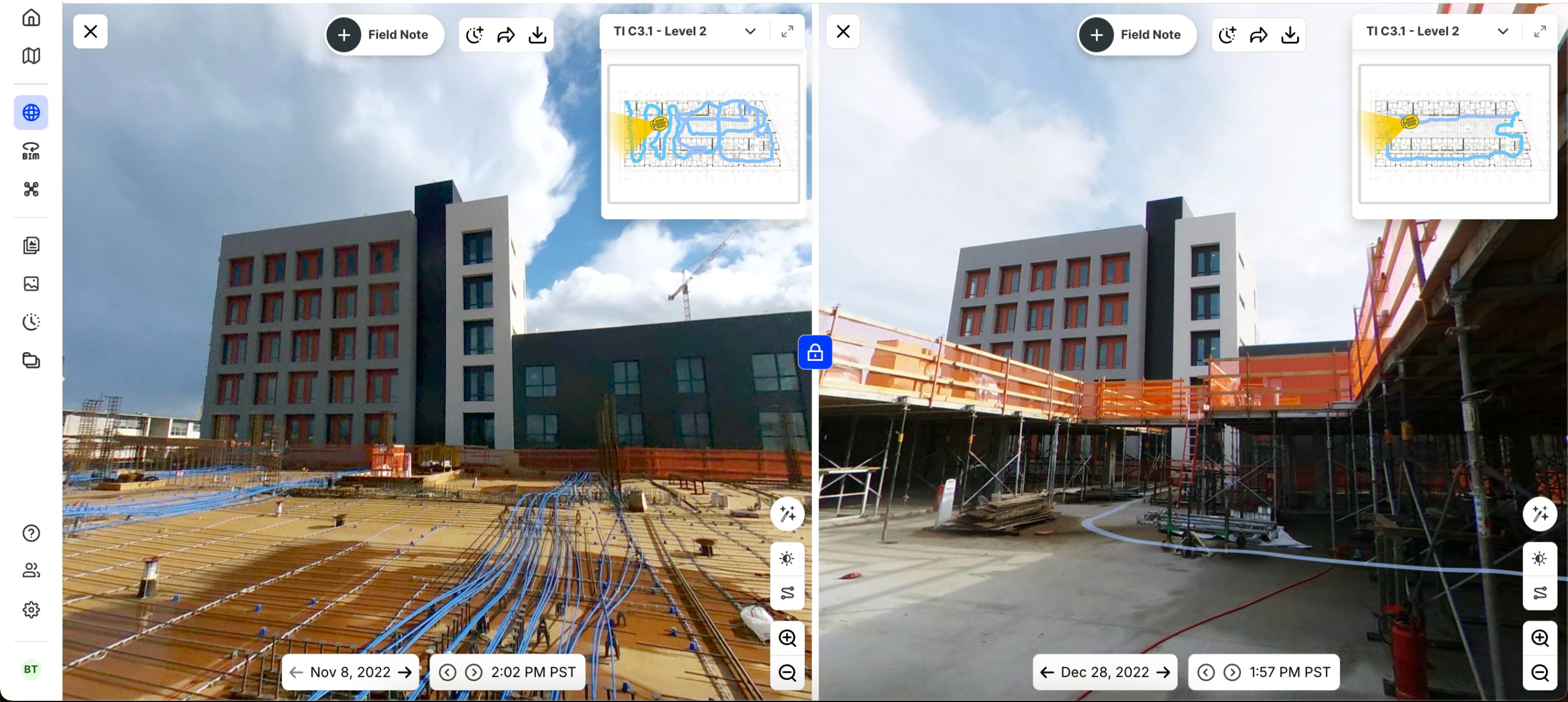
Sweet Projects did this on its Longcross data centre in the UK. The team started with weekly walks and moved to daily, and sometimes twice-daily, captures and built a 360° visual timeline, with every image time-stamped and pinned to the floor plan. OpenSpace puts a typical capture at about 25,000 sq ft in 10 minutes, so a higher cadence costs the site team little time and improves efficiency.
3. Match the capture method to the construction phase
Each phase calls for a different capture technology.
| Phase | Capture technology | What it documents |
| Throughout the job | Smartphones | Spot issues, such as a damaged cable tray or a blocked access route, logged as Field Notes and pinned to their exact location on the plan |
| Shell and interior fit-out | 360° cameras | Walkthroughs of each hall, time-stamped and mapped to the floor plan |
| Site preparation and earthworks | Drones with OpenSpace Air | Orthomosaics, elevations, and cut/fill measurements across a large footprint |
“Aerial capture earns its place right up until the roof goes on. Before that, one flight shows every pad, trench, and stockpile across the campus, and nothing on the ground can match it for earthwork. Once the shell is up, the drone keeps recording the building, but the progress has moved inside. On a data center, the roof can look the same for months while the halls underneath go from bare slab to fully built-out MEP. Teams that keep leaning on the flyover end up reporting on the envelope and missing the work that drives the schedule. At that point the drone belongs on what’s still outside, like equipment yards, utility corridors, and generator pads, and the 360° walk takes over everything under the roof.”
—Jess Lam, Product Manager, OpenSpace
4. Compare planned vs. actual with progress tracking
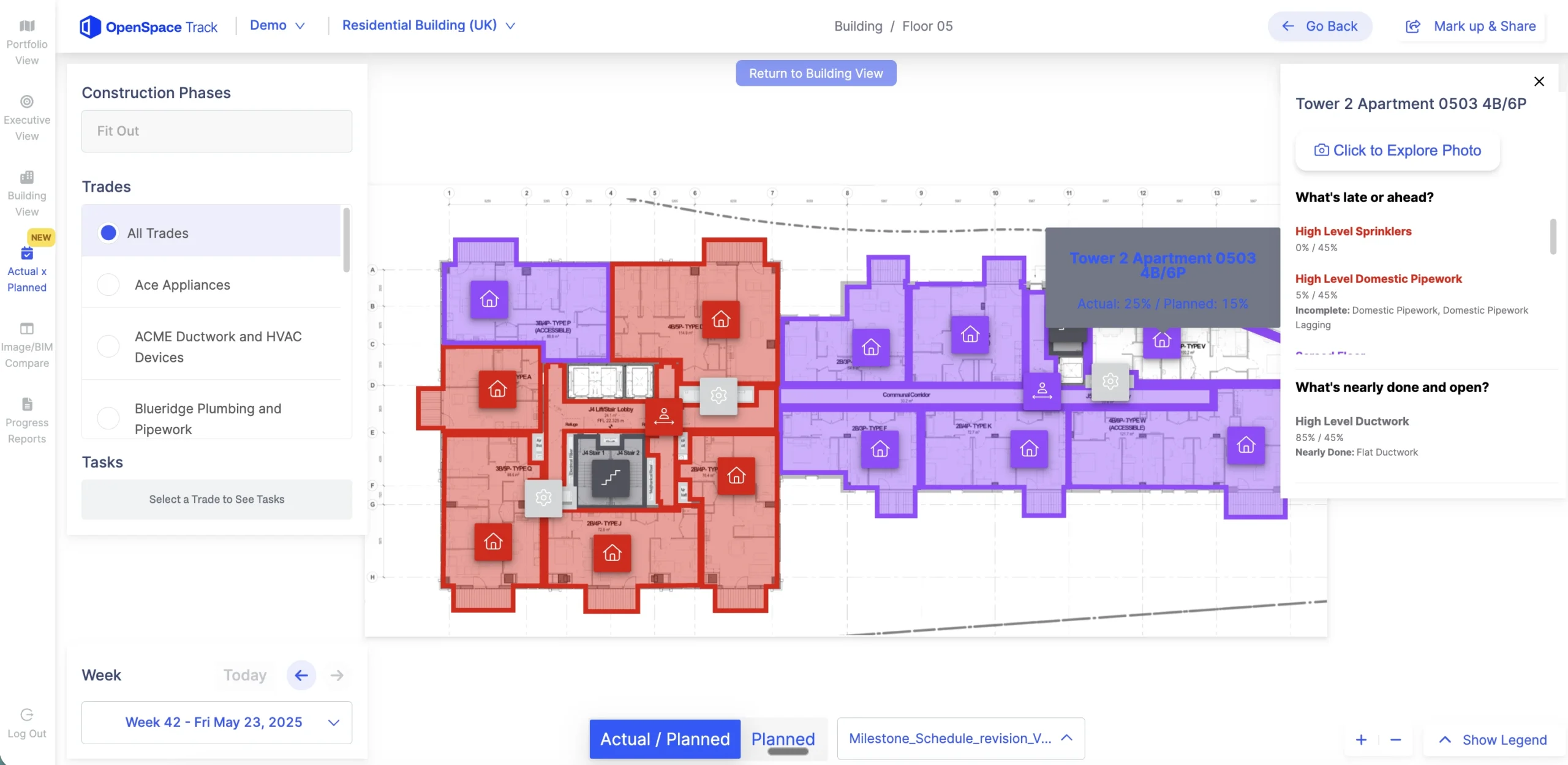
Captures turn into progress insights when someone measures them against the schedule, and that is the job of OpenSpace Track, OpenSpace’s construction progress tracking software. OpenSpace Track:
- Analyzes site captures to track 700 visual components across 200+ schedule tasks
- Pairs AI with human review, so teams can rely on the output for schedule and billing decisions
- Connects to the schedule, integrating with P6, Asta Powerproject, Microsoft Project, and Excel
- Delivers structured progress reports between 24 and 48 hours after a capture
- Flags unfinished work and blockers early through Spotlights
Potential delays surface while there is still time to shift resources or resequence trades, which matters on a data center, where a delay in one corridor can hold up a whole hall.
Switchgear skids, generators, and cooling modules are often built off site, so a hall can look on track while a critical piece of equipment is still at the factory. Read captured progress next to procurement and delivery status, and use the visual record to confirm when equipment lands and gets set in place. Weight capture toward critical-path areas too, where a small slip moves the delivery date.
See how OpenSpace Track turns everyday site captures into verified progress on data center projects. Request a demo.
5. Hand installed work to commissioning
Before start-up, give the commissioning agent a clean record of what was installed and where. Captures from earlier steps show each run of conduit, piping, and tray before it was covered, so the commissioning team can check questions against the visual record without opening a ceiling. The benefits last past handover, because the same record supports future maintenance and operations after the facility goes live.
What should a progress report for data center owners include?
A progress report for data center owners should show all three states by building and hall, measured against the dates that matter to the tenant. Owners read it to find out whether each hall will be ready when the customer needs it.
| Report element | What it shows | Who relies on it |
| Progress by building and hall | Installed, energized, and proven status for each space | Owner, owner’s rep, project executive |
| Milestones vs. contract dates | Forecast against ready-for-service and delivery dates | Owner, tenant, developer |
| Risks and blockers | Spotlights, open issues, and equipment still waiting on site | Project managers, owner’s rep |
| Visual evidence | Links to the captures behind each status | Anyone questioning a number |
Linxon shows how this works for remote teams. The company builds substations and grid solutions for data centers and other critical infrastructure, and it ran 360° walkthroughs every other day on a major project in Saudi Arabia. Its remote planners now update schedules from time-stamped captures instead of relying on weekly calls and manual follow-ups. “They no longer have to run after people for progress updates,” said Manikandan Rangasamy, Head of Planning AMEA at Linxon.
How does visual progress tracking help prevent cost overruns on data center projects?
Visual progress tracking helps prevent cost overruns by exposing slippage and disputes early, while they are still cheap to resolve. Two customer results show how.
| Customer | Project | Result |
| Sweet Projects | Longcross data centre, UK | 360° captures let the team defend its position and dismiss a claim |
| Linxon | Substation and grid projects across AMEA | Managers reported a 10% to 15% reduction in time spent on site once remote teams gained visibility into site conditions |
At Longcross, Project Director Andrew Moss relied on the Sweet Projects record when the claim came in. “It can’t be tampered with, which makes things easier if there’s a contractual argument or challenges with the supply chain. We have clear evidence,” he said.
OpenSpace announced in June 2026 that more than 1,000 data center projects worldwide have used its platform to capture and analyze jobsite conditions. Reality capture gets a team started. The larger payoff comes when those captures feed progress tracking and owner reporting inside one Visual Intelligence Platform.
For teams deciding how to track construction progress on data centers, explore how OpenSpace’s data center construction software supports owners and general contractors at campus scale.
Building a data center on a fixed delivery date? Talk to an OpenSpace expert about visual progress tracking across every building and phase.
Frequently asked questions
Does data center progress tracking require a BIM model?
No, OpenSpace Track does not require a BIM model. It tracks progress from 360° site captures, so anything visible on site can be measured. If a BIM model exists, OpenSpace Track can use it to strengthen the analysis.
Can progress tracking evidence support pay applications on data center projects?
Yes, visual progress evidence supports pay applications by showing work in place on the date it was billed. Teams use OpenSpace Track to validate work-in-place for billing and payment applications with time-stamped, location-pinned images. Owners and contractors then look at the same record when a pay app is questioned.
Can progress tracking start in the middle of an active data center build?
Yes, progress tracking can start at any point in an active data center build, since each new capture documents work in place from that date forward. Crews walk with smartphones or 360° cameras, and the captures map to the floor plan automatically. Starting before the next round of close-up gives the most value, because that is when the chance to verify buried work runs out.
Track installed, energized, and proven progress on your next data center build. Request an OpenSpace demo.