A schedule of values (SOV) breaks the total contract sum of a construction project into line items, each with a scheduled value, and it sets the basis for every pay application that follows. Pay apps move or stall on percent complete, and on many jobs someone enters that number as an estimate right before the billing cutoff.
An SOV holds up in review when a reviewer can locate, see, measure, and date each line item on the jobsite, and when dated 360° captures show the completed work behind every percentage billed.
What is a schedule of values in construction?
A schedule of values is the line item breakdown of the contract price that a general contractor submits before the first payment application. The architect or owner’s representative then uses it to review progress billing for the entire project. The schedule of values requirements in AIA A201-2017 ask the contractor to allocate the full contract sum across the work, backed by data that supports its accuracy.
On AIA forms, a schedule of values in construction lives on the G703 continuation sheet, which supports each G702 application for payment. A schedule of values template like the G703 gives both project owners and general contractors the same document to work from, whether the SOV sits in a spreadsheet or in project management software.
What goes on a schedule of values?
A schedule of values lists each line item with its scheduled value, work completed to date, stored materials, retainage, and balance to finish.
| Column | What it records |
| Item and description | The work task or cost category, such as metal stud framing on level 2 |
| Scheduled value | The dollar amount assigned to that line item; all lines add up to the total contract value |
| Work completed, previous | Value billed in earlier payment periods |
| Work completed, current period | Value of work installed since the last pay app |
| Stored materials | Materials delivered and stored but not yet installed |
| Total completed and stored | Running total to date |
| Percent complete | Total completed compared to the scheduled value |
| Balance to finish | Scheduled value minus total completed |
| Retainage | Amount held back under the contract terms |
Subcontractors submit SOVs for their own scopes, and the general contractor rolls those lines into the prime pay app. A drywall sub’s percent complete on level 3 becomes part of the GC’s number, then part of the owner’s draw. One unchecked estimate can pass through two or three approval layers before anyone walks that floor.
Why is percent complete the hardest column to defend?
Percent complete is the hardest column to defend because it rests on judgment, while every other column follows from arithmetic. Scheduled value and prior billing come straight from the contract and earlier pay apps. Percent complete depends on what someone believes is installed today, and that belief often comes from a walk done days before the cutoff.
How does front-loading affect cash flow management?
Front-loading shifts extra value into early line items so the contractor’s cash arrives sooner, and the owner gives up some financial control in the process. AIA guidance notes that the architect may review supporting data to confirm the SOV isn’t front loaded, because early overpayment becomes the owner’s problem if the contractor defaults.
Public owners follow the same logic. The FAR 52.232-5 progress payment clause bases federal progress payments on estimates of work accomplished and asks for an itemization of the contractor’s work tied to the elements in the contract.
How billing gaps hit cash flow and labor costs
A contractor who overbills pulls cash forward and sets up a hard correction later. A trade that underbills does the opposite, carrying its own labor costs for work already in place and waiting a full payment period to recover them.
Both create cash flow issues and slow payment release, and both grow when the distance between expected billing and actual progress is hard to see. A single line reading “Drywall, entire building” gives a reviewer nothing to compare against, so the debate turns into opinion. The gap shows up on the contractor’s books too, because under the percentage-of-completion method, percent complete turns into revenue.
“When a PM and a trade land on different numbers, I look at the line item first. A line that reads ‘drywall, level 3’ bundles framing and finish, so one person is counting studs while the other is counting taped walls. Timing makes the gap wider, because a walk on Monday and a billing cutoff on Friday describe two different sites. Definitions of ‘done’ are the easiest to settle: agree up front what share of the line hung board earns, and that argument goes away. Split the line by location and date the walk, and most disputes never start.”
—Michaela Rhile, Product Manager, OpenSpace
How do you build an evidence-ready schedule of values?
You build an evidence-ready SOV by writing each line item so a reviewer can check it against the site. Treat the four questions below as a structured framework and run every line through them before the SOV goes to the owner:
| Test | Question for each line item | It fails when |
| Locate | Can a reviewer find this work on the floor plan? | The line spans the whole building |
| See | Will this work show up in a site capture? | The line mixes visible work with paperwork costs |
| Measure | Does progress have a unit, such as linear feet or square feet? | Progress is a guessed percentage |
| Date | Can the work be tied to a specific payment period? | Nobody records when the work went in |
1. Split line items by location and trade
Break the project’s scope by floor or zone, using the same areas your field team already captures, so each line item maps to a place on the plans. A line item breakdown at this level takes longer to set up and pays back on every pay app after it.
2. Match line items to the project schedule
Map each line to schedule tasks and project milestones, including start and end dates. Percent complete on the SOV should match progress on the construction schedule. Capture the site in the days before each billing cutoff so the record matches the current period. For more on capture cadence and project monitoring, see this guide to construction progress monitoring.
3. Pick a unit of progress for each work task
Framing and duct track well in linear feet, while board and finishes track in square feet. With a unit in place, “about 70 percent” becomes an installed quantity anyone can check. Fixtures and equipment track as counts.
4. Set stored-materials rules in the contract documents
Stored materials bill before installation, so agree early on the proof each payment requires, such as delivery records and photos of the storage location. Clear rules prevent the stored materials column from becoming a second place to front-load.
5. Separate indirect costs from installed work
General conditions and insurance are project costs that bill over time, while installed work bills against progress. Keep indirect costs on their own lines so a reviewer can tell time-based billing apart from work in place.
Illustrative example: one drywall line, rewritten
Applied to a single drywall line on a multi-story job, the five steps above turn one unverifiable number into line items a reviewer can check.
| Line item | Unit of progress | Evidence for the pay app |
| Before: drywall, entire building | Estimated percent | Notes from a site walk |
| After: level 2 metal stud framing | Linear feet | Dated 360° capture of level 2 |
| After: level 2 board and finish | Square feet | Dated 360° capture of level 2 |
| After: level 3 metal stud framing | Linear feet | Dated 360° capture of level 3 |
See how dated captures back each line item on your next pay app. Request a demo.
How does visual proof support each pay application?
Visual proof ties each percent complete to a dated, location-pinned capture, so a reviewer can check the claim against the jobsite without driving out to it. Field teams walk the site with a 360° camera or smartphone, and OpenSpace Capture maps every image to the floor plan with its date and time through Spatial AI.
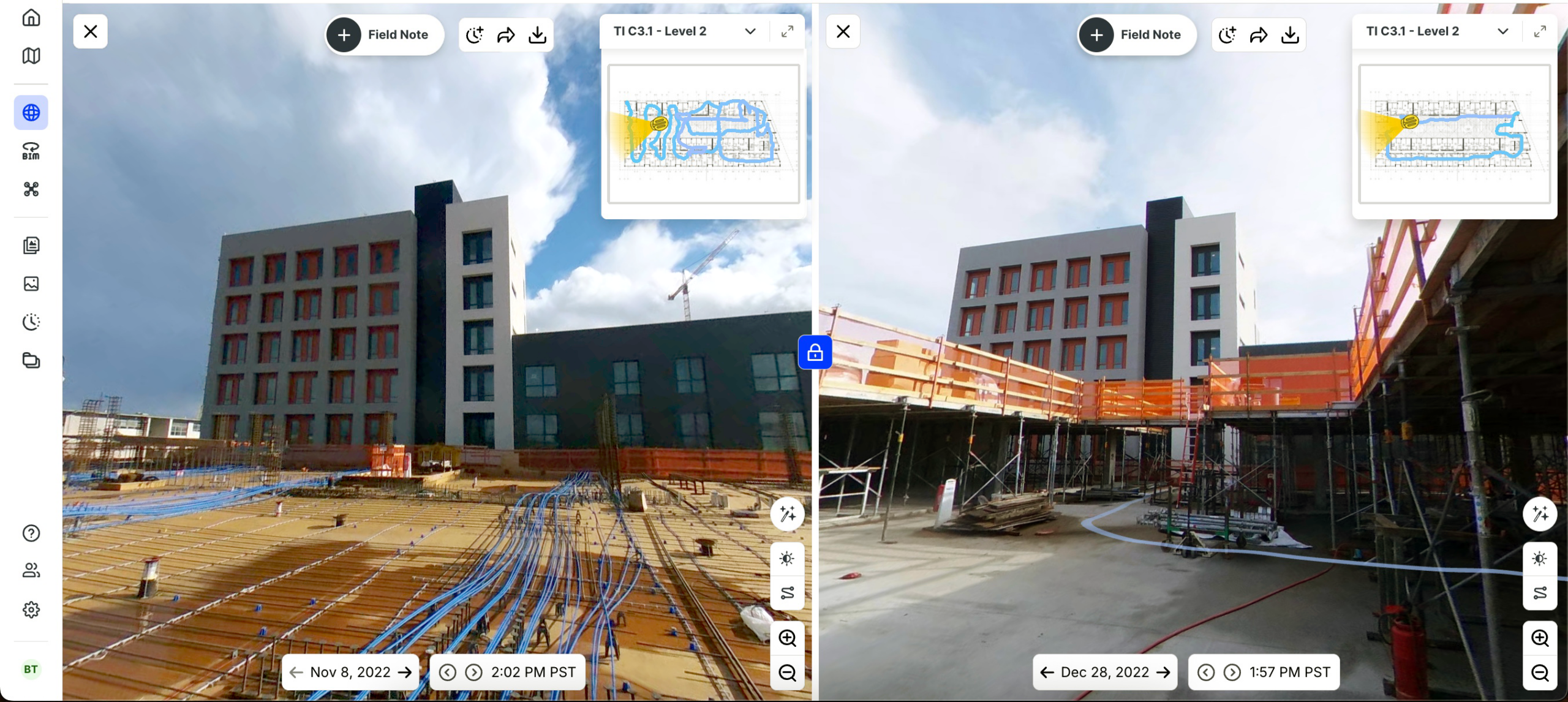
See the current period side by side
Split View puts the same location on two dates next to each other. Set the last pay app date against this week’s capture, and the current period of work completed becomes visible line by line.
Verified percent complete by trade, floor, and task
Verified construction progress tracking with OpenSpace Track adds a checked percent complete to those captures. AI processes the images, then trained specialists review the results before your team receives them. Each update gives you:
- Completion percentages against plan by project, trade, floor, room, and task
- Installed quantities in units such as linear feet or square feet
- Spotlights that flag incomplete tasks and rework
- Schedule integrations with P6, Asta Powerproject, Microsoft Project, and Excel, so verified progress lands in the project schedule your team already runs
Conflict resolution and contractual compliance for key stakeholders
Payment management on a construction project runs through several reviewers, and each asks a different question about the same line item. Visual evidence gives each of them an answer they can check.
| Reviewer | Question about a line item | Evidence that answers it |
| Subcontractor | Will the billed percent hold up with the GC? | Captures of the trade’s own scope, by floor |
| GC project manager | Does the sub’s pay app match work in place? | Split View for the current period |
| Owner’s representative or architect | Is the SOV front-loaded, and is this amount certifiable? | Verified percent complete against plan |
| Lender’s inspector | Does the draw match completed work? | Dated captures shared ahead of the site visit |
How builders use visual proof on pay applications
| Builder | How it uses OpenSpace | Result for the payment process |
| Nibbi Brothers General Contractors | Verifies work for subcontractor payments with visual records | $15,400 in billing discrepancies avoided on one project |
| RG Construction, a Chicago-area drywall contractor | Uses OpenSpace Track to identify percent complete and show when it’s ahead of schedule | Invoices that are easier to approve on time |
| U.S. Engineering | Has used OpenSpace Track to generate percent completes for sheet metal installation | Support for its monthly pay applications |
“It’s the holy grail for trade contractors to have consistent data points that are easily quantifiable,” says Brian Garcea, Principal at RG Construction.
“A progress photo shows that work happened somewhere. Verified progress shows how much of a specific line item is in place, on a specific date, measured against the plan. An owner’s rep can’t certify a percentage from a photo of a hallway, but they can certify one when the capture is pinned to the floor plan and the installed quantity is checked against the scope. The line items that gain the most are the ones that get covered up, like in-wall rough-in and framing. Once the board goes up, a dated capture is the only way left to show what was installed behind it.”
—Michaela Rhile, Product Manager, OpenSpace
Bring verified percent complete into your next billing cycle. Talk to OpenSpace.
Frequently asked questions
Is a schedule of values required on every construction project?
Not always: AIA A201-2017 requires a construction schedule of values before the first payment application on stipulated sum and Guaranteed Maximum Price contracts. ConsensusDocs contracts use ConsensusDocs 293, and federal fixed-price work requires an itemized payment request under FAR 52.232-5. Cost of the work contracts can use AIA’s G703CW continuation sheet.
How does retainage show up on a schedule of values?
Retainage has its own column on the continuation sheet, calculated on each line item’s total completed and stored at the rate set in the contract terms. It builds from one pay application to the next, and the contract documents set when the owner releases it. A dated record of completed work makes that final release easier to support at closeout.
Can a schedule of values change after it’s approved?
Yes. Approved change orders adjust the original contract sum and get added as new line items or listed on a separate continuation sheet, and under AIA A201-2017 the architect reviews revisions as actual costs shift. Reallocating value between existing lines without approval invites a dispute.
How is a schedule of values different from a construction schedule?
An SOV assigns dollar values to scope, while a construction schedule assigns time and sequence to the same work. The two work best when each SOV line maps to schedule tasks, so financial progress and project progress match.
Does visual proof replace the architect’s certification or a lender’s inspection?
No. Certification and any lender inspection stay with the parties named in the contract documents. Dated captures give those reviewers evidence to check before they sign, which shortens the discussion about what’s installed.
Verified line items, tighter cost control
Write line items a reviewer can locate and measure, then attach verified percent complete from a capture taken before each cutoff. Owners and builders then settle billing questions from the same record, and cost overruns show up while there’s still time to act on them.
See OpenSpace Track verify progress on a live project. Request a demo.