
Construction mapping turns drone flights, 360° walks, and site plans into a located, dated record of the job site that teams can measure and share. Decisions about logistics, quantities, progress, and quality then rest on current existing conditions instead of last week’s walk or a months-old aerial photo, and that is where the jobsite performance gains come from. The most useful construction mapping software connects the view from above with the view inside the building and the plans the work is built from.
Much of the construction industry still treats a site map as a one-time drone deliverable. Teams that work this way lose sight of the building interior and of everything that happens between flights, and costly delays tend to start in those gaps.
What is construction mapping in the construction industry?
Construction mapping is the practice of capturing a construction site on a regular schedule and tying every image and measurement to a location on the site plans or model. The result is a set of interactive maps that project managers, superintendents, and owners can open from the field or the office to see the site as it stood on any date.
Construction site mapping builds on land surveying without replacing it:
| Land surveying | Construction mapping | |
| Who does it | A licensed surveyor | Field teams, drone pilots, and VDC staff |
| What it produces | Boundaries, control points, legal elevations | Dated orthomosaics, 360° captures, and measurements tied to plans |
| How often | At key milestones | On a regular cadence through the whole project |
| Questions it answers | Where is the property line? What is the design grade? | Where was the fill stockpiled? Which utilities run under the new access routes? |
The three layers of a useful construction site map
A construction site map is most useful when it combines three layers, because each one answers questions the others can’t.
- The aerial layer. Drone mapping produces orthomosaics, elevation models, and point clouds of the whole site, showing earthwork, laydown areas, equipment staging, and access.
- The ground layer. 360° captures from a site walk, pinned to the floor plan by software, show interiors, MEP rough-in, and conditions behind walls.
- The plan and model layer. Site plans, utilities drawings, and BIM models give every image a reference point for comparing what was built against what was designed.
Planners use satellite data for site analysis and project planning, such as checking zoning regulations or surrounding existing structures. Satellite imagery doesn’t refresh often enough to follow a single building through construction projects, so the aerial and ground layers carry the load once construction begins.
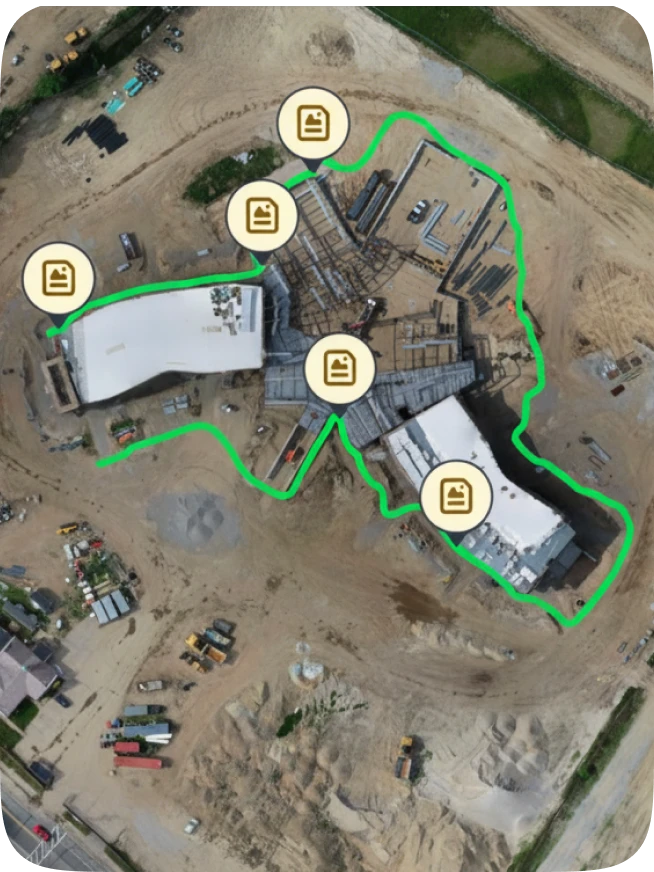
OpenSpace brings all three layers into a single platform. OpenSpace Air, the drone mapping software for construction inside the OpenSpace Visual Intelligence Platform, layers site plans, utilities, and other drawings on top of drone captures, and its orthomosaics can serve as the base sheet for 360° ground captures from day one.
How does construction mapping software improve job site performance?
Construction mapping software improves job site performance in four places: site logistics and earthwork, progress verification, documentation before close-up, and coordination with remote stakeholders.
Site logistics, laydown areas & drone mapping for earthwork
On large projects, the site changes faster than the logistics plan. A current orthomosaic shows where materials sit, whether laydown areas have crept into access routes, and where equipment can stage next. Superintendents can mark up the map view instead of redrawing the plan by hand.
The same flights support quantity checks. From one orthomosaic, teams can:
- Measure stockpiles by area and volume
- Calculate cut and fill volumes
- Compare any two flights to see how much material was added or removed
These checks give resource allocation and resource management decisions a firm footing, such as when to book trucks or whether an earthwork push needs dedicated resources.
Construction progress tracking that holds up in pay applications
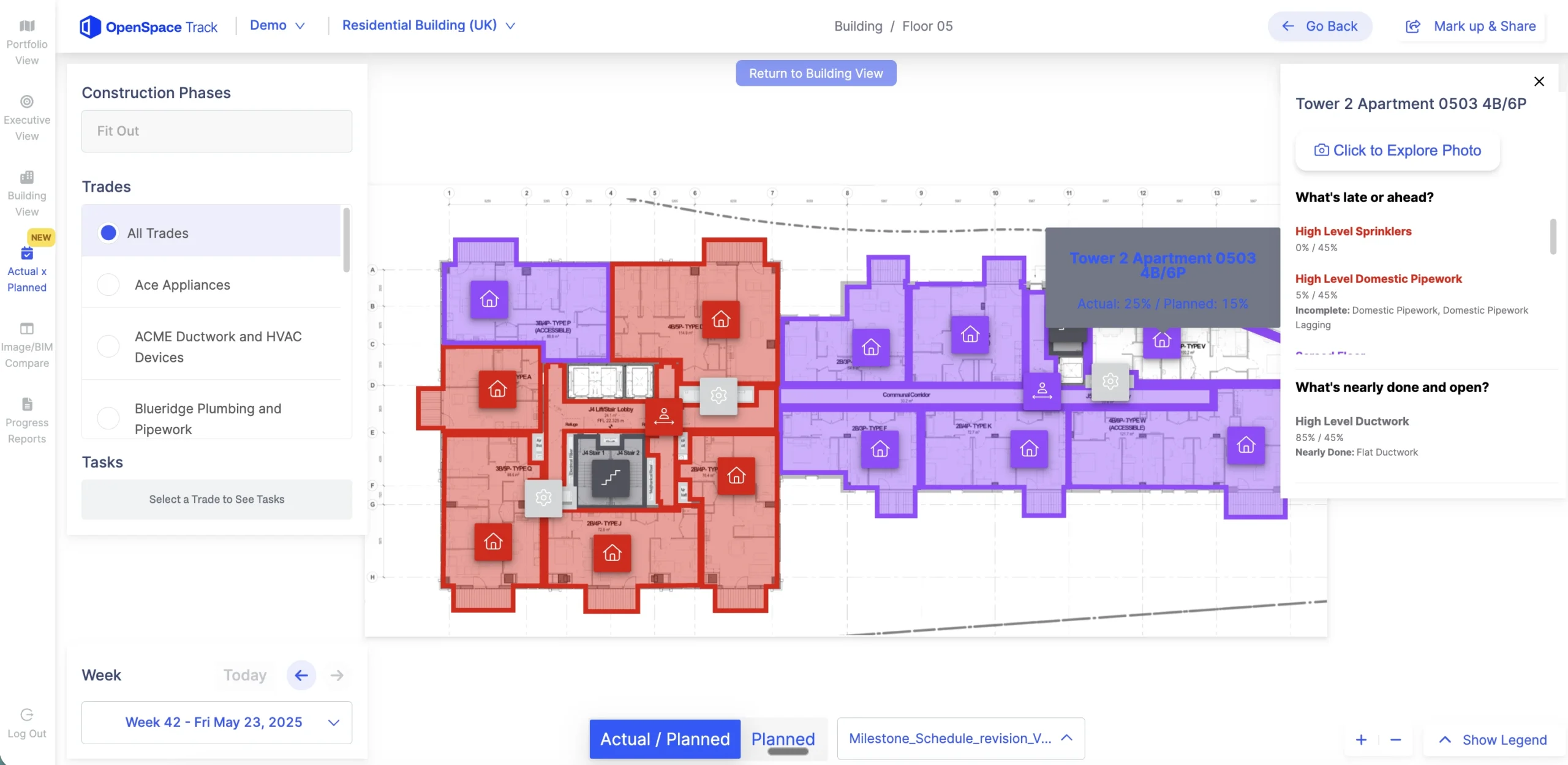
Progress claims carry more weight when they’re tied to dated imagery on a plan. When every capture sits at a known location and date, project managers can show owners what was installed by the end of a pay period. Dedicated construction progress tracking software, such as OpenSpace Track, compares site captures with the schedule to report planned versus actual construction progress, without requiring BIM.
Catching potential risks before walls close
The most valuable interior map is the one captured just before insulation and drywall go up. After that, confirming a pipe location means cutting holes. LandSouth Construction, a multifamily builder in the Southeast, made pre-close-up walks a standard step. Its case study reports these results:
| Measure | Manual process | With OpenSpace |
| Full pre-close-up documentation pass | Two days | 15 minutes |
| Behind-the-wall coverage per unit | 60 to 70% | 100% |
General Superintendent Bailey Ghazi summed up the practice: “The major key for us is to do the OpenSpace walks before we go to insulation.” A located record also strengthens quality control and safety reviews, because potential issues are pinned to a spot on the plan instead of buried in a text log.
Interactive maps & a shared map view for remote stakeholders
Owners and executives can’t walk the site as often as they would like. With interactive maps, these users get a comprehensive view of active projects without a trip, and field and office teams can settle questions in one conversation. At Suffolk, which uses OpenSpace Air alongside ground capture, Adam Fyrer, Senior Associate, Construction Technology, said: “OpenSpace Air gives us a true bird’s-eye view of the entire site.”
“When superintendents open an orthomosaic of their own site for the first time, most of them check it against the logistics plan. The plan in the trailer shows where materials and access were supposed to go at mobilization. The map shows where the laydown area has spread and where a stockpile now sits on top of a utility run. Before that, the picture lived in the superintendent’s head and a handful of phone photos. The first change is small, like moving a material drop. The bigger one comes later, when the field and the office start every conversation from the same map.”
—Jess Lam, Product Manager, OpenSpace
Request a demo of OpenSpace Air.
Once the envelope closes: ground capture & BIM models take over
What drone maps miss after the building is enclosed
Drone mapping is strongest during sitework and structure. Once the envelope goes up, a drone sees the roof and little else, while coordination risk moves inside to MEP routing and trade sequencing. This handoff is where many construction site mapping programs lose continuity: the aerial record stops, and the interior record hasn’t started.
How ground capture keeps one record to final completion
Ground capture fills that gap. With OpenSpace Capture, crews walk each floor with a smartphone or 360° camera, and Spatial AI pins every image to its spot on the floor plan.
Orthomosaics and floor plans sit on the same platform, so teams keep one record from site clearing to final completion. Teams using OpenSpace BIM+ can compare captured conditions with BIM models and catch deviations before other trades build on top of them. For background on these capture methods, see this guide to reality capture in construction.
“Drone flights answer the big questions until the building dries in. After that, the questions move inside: is the overhead rough-in done on level four, and did the sleeves land where the model says? A drone can’t see either one. The teams that handle the transition well start ground walks while the structure is still going up, so the interior record already exists when the roof goes on. They keep flying for the sitework around the building, just less often. The teams that struggle keep the same flight schedule and wonder why the maps stopped being useful.”
—Jess Lam, Product Manager, OpenSpace
How often should you map a construction site?
Map the site as often as the decisions it supports change: frequent flights during sitework, ground walks every one to two weeks once interiors start, and an extra walk before every close-up. Suffolk offers a benchmark, since its case study says OpenSpace is expected on every job to capture comprehensive site documentation at least every two weeks. The table below is a starting point for a regularly updated cadence.
| Phase | Map layer | Suggested cadence | Decisions it supports |
| Preconstruction | Satellite data, survey, initial drone flight | Once, plus before mobilization | Site analysis, zoning regulations, access routes, laydown planning |
| Sitework and earthwork | Drone mapping | Weekly | Stockpile volumes, cut and fill, haul scheduling |
| Structure | Drone flights plus ground walks | Every one to two weeks | Logistics changes, crane and equipment staging, progress |
| Envelope and interiors | 360° ground walks mapped to plans | Every one to two weeks, plus before close-up | Progress tracking, quality control, behind-the-wall records |
| Closeout | Ground walks and a final flight | At turnover | Punch, final completion, owner handover |
Comparing construction mapping software: four approaches & what to look for
Tools and software in this category fall into four broad approaches. The right fit depends on whether a team needs to see the site from above, document the inside, or both.
Four approaches compared
| Approach | Typical outputs | Interior coverage | Plan and BIM alignment | Best fit |
| Drone photogrammetry platforms | Orthomosaics, elevation models, point clouds | Limited to what a drone can see | Site plan overlays | Sitework-heavy and horizontal projects |
| 360° ground capture platforms | 360° imagery located on floor plans | Strong | Floor plans; BIM comparison varies by product | Vertical and interior work |
| Survey and GIS software | Control, topography, geospatial layers | Not designed for interiors | Strong geospatial reference | Survey-grade control and large civil work |
| Visual Intelligence Platform | Aerial and ground captures, measurements, progress reports | Strong | Plans, utilities, and BIM models | Contractors who need one record across the full project |
What to look for in construction mapping software
When evaluating mapping software, look past the features to these criteria:
- Repeatable accuracy. The ASPRS positional accuracy standards added guidance for photogrammetry and unmanned aerial systems in 2024, giving teams a shared vocabulary with their surveyors. OpenSpace Air uses virtual control points to lock orthomosaic maps to the same location every time.
- Aerial and ground in one place. Separate logins for drone and interior records split the history of the project.
- Fit with existing processes. Native workflows with Procore Punch Items and Observations or Autodesk Construction Cloud (ACC) Issues move project data into project management systems without re-entry.
- Field adoption. If superintendents won’t capture, the map goes stale. Smartphone capture lowers the barrier.
- A clear rollout path. Start with one project and expand once crews see the value. LandSouth began with a single pilot, and in under a year adoption grew to six active projects.
- Measurement and export. Distances, areas, volumes, and CSV exports feed estimating and reporting.
Talk to OpenSpace about mapping across your active projects
Keeping the map current through turnover
General contractors get the most from site mapping when they keep the map current from the first flight over raw ground to the last walk before turnover. With drone mapping, ground capture, and plans in one record, project managers and other construction professionals have real-time visibility into progress and conditions. That record helps them improve decision making while a fix still takes a phone call, before it turns into a change order and added cost.
Frequently asked questions
Do you need a licensed pilot to map a construction site with a drone?
Yes, in the United States, commercial drone mapping falls under the FAA’s Part 107 rules. The pilot needs a remote pilot certificate, or must be directly supervised by someone who holds one. Part 107 caps most flights at 400 feet above ground and restricts flying over people who aren’t part of the operation.
How long does it take to process drone imagery into a usable map?
Processing takes hours in most cases. OpenSpace Air turns drone images into orthomosaic maps, elevation models, 3D meshes, and point clouds in hours rather than days. Larger sites and higher image counts take longer to process.
How does augmented reality relate to construction mapping?
Augmented reality overlays digital models on a live camera view of the job site, while mapping records what the site looked like on a given date. Augmented reality helps crews visualize what will be built, and maps document what was built. Both depend on accurate alignment to the same plans and control.
Can owners use construction maps after final completion?
Yes. A dated, located record of the site, including conditions behind walls, helps owners and facilities teams find utilities and plan renovations without opening finished surfaces. Teams should agree at contract stage who keeps access to the record after turnover.