For trade contractors
Show your work. Get paid.
The Visual Intelligence Platform for trades—from MEP’s to drywall, framing, concrete, and every specialty in between. Capture your work before it’s covered up. Turn images into proof. Get paid faster, with fewer disputes. Because when you can show exactly what you did, there’s nothing left to question.


















One platform, from rough-in to closeout
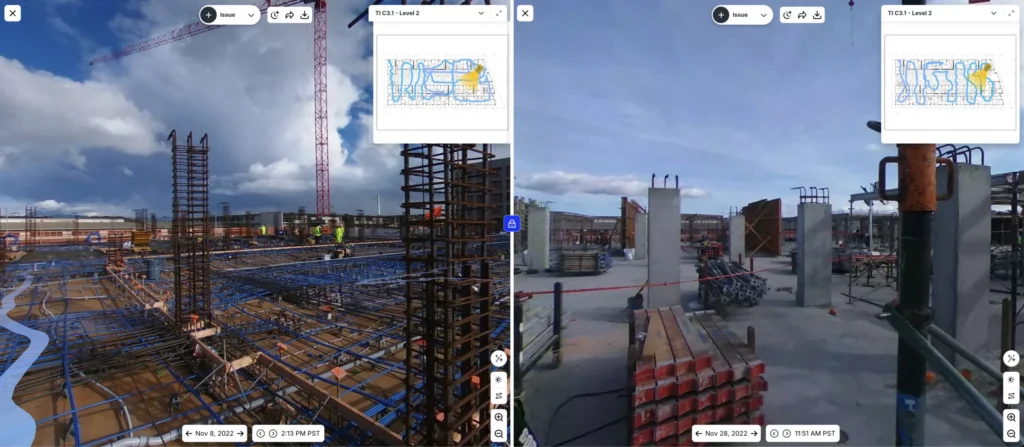
Document work before it's covered up
Capture your work with a smartphone or 360° camera. Create a complete visual record before drywall, slab pours, or ceiling grids go in. Do in-wall inspections from anywhere. Verify concealed work without opening it up. Answer questions, and protect your work long after the job is finished.
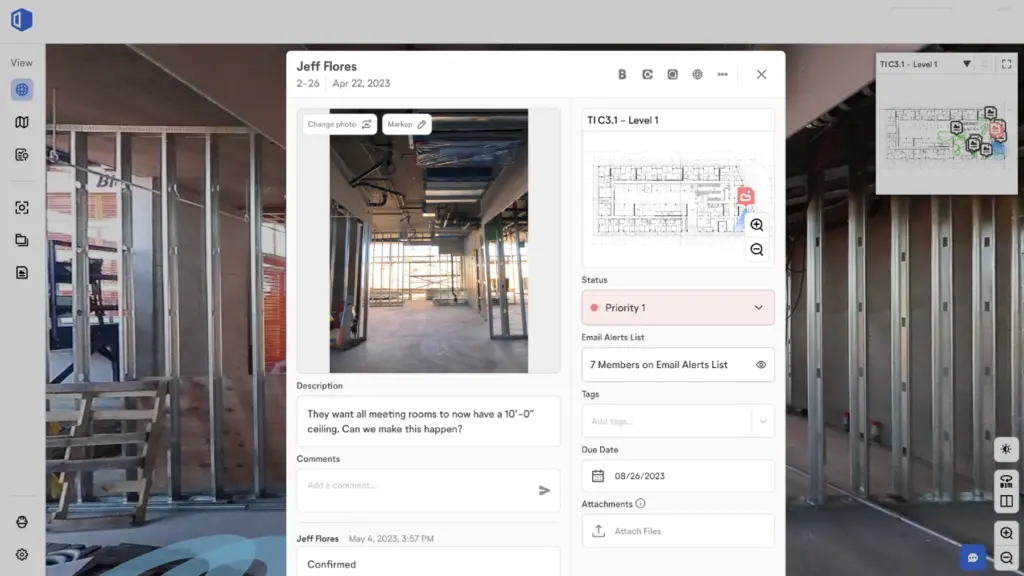
Get paid faster
Support pay apps, change orders, and backcharge conversations with time-stamped imagery mapped to the exact project location. Log an issue, flag a delay, or attach proof in seconds. When questions come up, the proof is already there—no digging through photos or making another site visit.
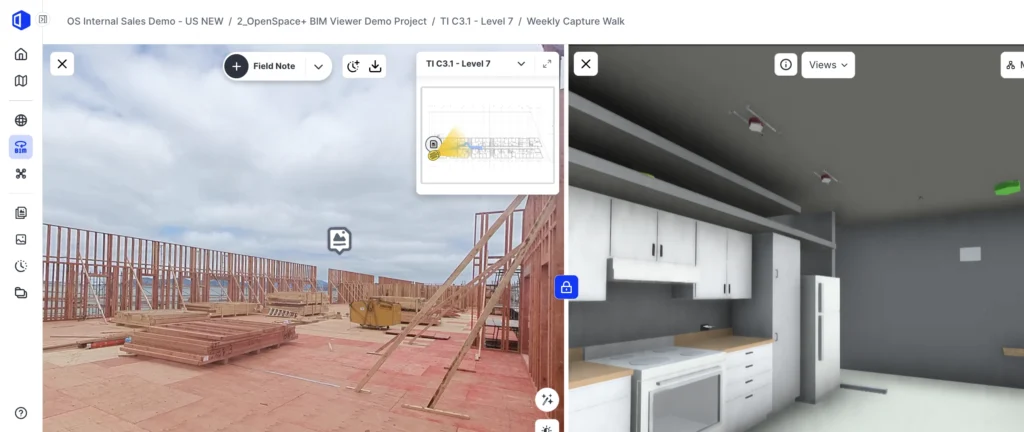
See progress clearly
Turn your visual record into verified progress insights. Track percent complete and understand what’s finished across floors, trades, and zones. Keep crews, project managers, and customers aligned without relying on manual updates. Give teams easy access to BIM—so they can answer questions right from the field and keep work moving.

“It’s the holy grail for trade contractors to have consistent data points that are easily quantifiable to identify your percent complete based on where you are in the project.”
By the numbers
Real results from trade contractors using OpenSpace:





All in one
Capture everything easily. See it in one place. Connected with the tools you use.
Speed unlocked with AI
Create issues up to 86% faster with AI Voice Notes and AI Autolocation. Turn what you see and say into complete, workflow-ready items in seconds.
Deep integrations
Create Autodesk Issues and Procore Observations and Punch items once—mapped correctly and synced both ways—so your data stays up to date everywhere.
Automated & powerful
AI does the heavy lifting—mapping images and delivering intelligence for confident decisions.
Revolutionize project management with OpenSpace
Watch our webinar with Big State Electric to hear how the team uses OpenSpace to overcome labor shortages, streamline workflows, and enhance communication. Learn from their real-world experiences and see how OpenSpace is driving productivity and improving project outcomes across the organization.


Support & learning. On your time.

OpenSpace academy
Free, on-demand courses with easy-to-follow instructions, tips, and tricks.

Support
Our 360° approach to support: 24×6 support lines plus online support for advice and answers.

ROI
Resources for evaluating how OpenSpace can help you build faster and with less risk.

Frequently asked questions
What is OpenSpace?
OpenSpace is the Visual Intelligence Platform for builders. For trade contractors, that means visual proof of your scope, delivered in a form that accelerates pay apps, reverses backcharges, and protects your margin.
Capture your work with a smartphone or 360° camera. Our Spatial AI engine anchors every image to time, place, and your plans, so you have a defensible, searchable record of what your crew installed and when.
One platform, five products:
- OpenSpace Capture: the foundational visual record of your scope
- OpenSpace Air: drone imagery for site logistics and exterior scopes
- OpenSpace Field: image-first task management, punch, and coordination
- OpenSpace BIM+: 3D model access for MEP field teams
- OpenSpace Track: reality-grounded progress data for pay apps and productivity
Used on 100,000+ projects across 131 countries.
How much data can I capture?
- As often as your crew walks their scope. There is no cap on captures or images for our Core or Enterprise plan (see plans).
- For trade contractors, the highest-value moments to capture are before rough-in, after your work is complete, and just before other trades cover your work with drywall, concrete, ceilings, or finishes. That is the record that protects you when questions come up months (or years) later.
- More capture = more coverage = stronger backcharge defense and cleaner pay apps.
What is the difference between OpenSpace and other reality capture tools?
- Most tools document. OpenSpace helps you act on what is captured. For trades, that means turning visual proof into faster pay apps, protected scope, and quantifiable percent complete.
- Image-first workflows: tap once from a photo to raise an issue, log a delay, or attach visual evidence to a pay app or RFI.
- Spatial AI engine: imagery automatically anchored to your plans and BIM, no manual pinning.
- The largest visual data foundation in construction (69 billion+ sq ft), which is what powers the accuracy and speed trades rely on.
How quickly can I start capturing? How fast is your processing speed?
- Project setup takes 5 to 10 minutes. Upload your plans, mark your start point, and capture.
- Walk your scope with a 360° camera on a hard hat, or use a smartphone with AI Autolocation in OpenSpace Field.
- Images are ready to view in ~15 minutes on average, automatically aligned to your plans and BIM model.
How easy is it to roll out OpenSpace at scale and gain adoption?
- Trade contractors typically see value on the first capture and expand from single projects to enterprise rollouts within 3 to 6 months.
- Built for the field from day one. Capturing adds little to no extra work to a normal walk, so adoption sticks.
- Works on Android and iOS. Integrates with Procore and Autodesk.
- Free, on-demand training via OpenSpace Academy, plus 24×6 support.
Does OpenSpace work with drones?
- Yes, through OpenSpace Air. Import drone imagery and transform it into point clouds, 3D meshes, and orthomosaics, all inside the same platform.
- Most useful for trades with exterior scopes (concrete, framing, site work) or for site logistics on large-format projects.
- Compatible with DJI, Skydio, and Esri-supported drones.
Does OpenSpace use AI? What about AI agents?
- Yes, OpenSpace has been AI-powered since day one. Our Spatial AI engine locates every image in space and time, understands what is in it, and connects it to your plans, models, and workflows.
- Newer AI capabilities include AI Autolocation in OpenSpace Field (real-time indoor positioning without beacons or special hardware) and AI Voice Notes (spoken field context turned into structured, searchable data).
- On AI agents: agents are coming to construction, and they need eyes. The structured visual data on OpenSpace is the foundation agents need to operate. We are working with a small group of builder partners through an Early Access program on agent use cases like issue review, safety, and site search. For more, see the OpenSpace blog.
Do big trade contractors work with OpenSpace?
- Yes, OpenSpace is trusted by leading trade contractors including Power Design, U.S. Engineering, Polk Mechanical, Valley Interior Systems, Western Partitions, RG Construction, and CEC Facilities Group.
- Especially deep coverage in mechanical, electrical, and interior specialties.
- Enterprise-ready: SOC 2, Cyber Essentials, SSO, and regional data residency.
- Backed by blue-chip investors with nearly $200M raised to date.
What other software does OpenSpace integrate with?
- Deep two-way integrations with Procore (Observations, Punch items) and Autodesk (Issues). Tap once from an image in OpenSpace Field to create work in your system of record.
- Pull schedule data from P6, Asta, Microsoft Project, and Excel into OpenSpace Track for reality-grounded progress reporting.
- APIs (Images, Field Notes, Usage) and SSO for enterprise IT.