
Construction progress tracking, made simple
OpenSpace Track
Know what's built, what's behind, and where your project is headed. Construction progress tracking software that delivers verified progress, installed quantities, and schedule insights.

Expert-verified
AI processing with expert review. Walk into OAC meetings and pay app reviews with confidence.
Measure what’s installed
Track percent complete or installed quantities in linear feet, square feet, and units—marked up on your drawings.
Total task visibility
Track 700 visual components in 200+ schedule tasks.
Tracks your way
Customize to track unique conditions and deploy on any project—no BIM required.

Progress tracking with Visual Intelligence
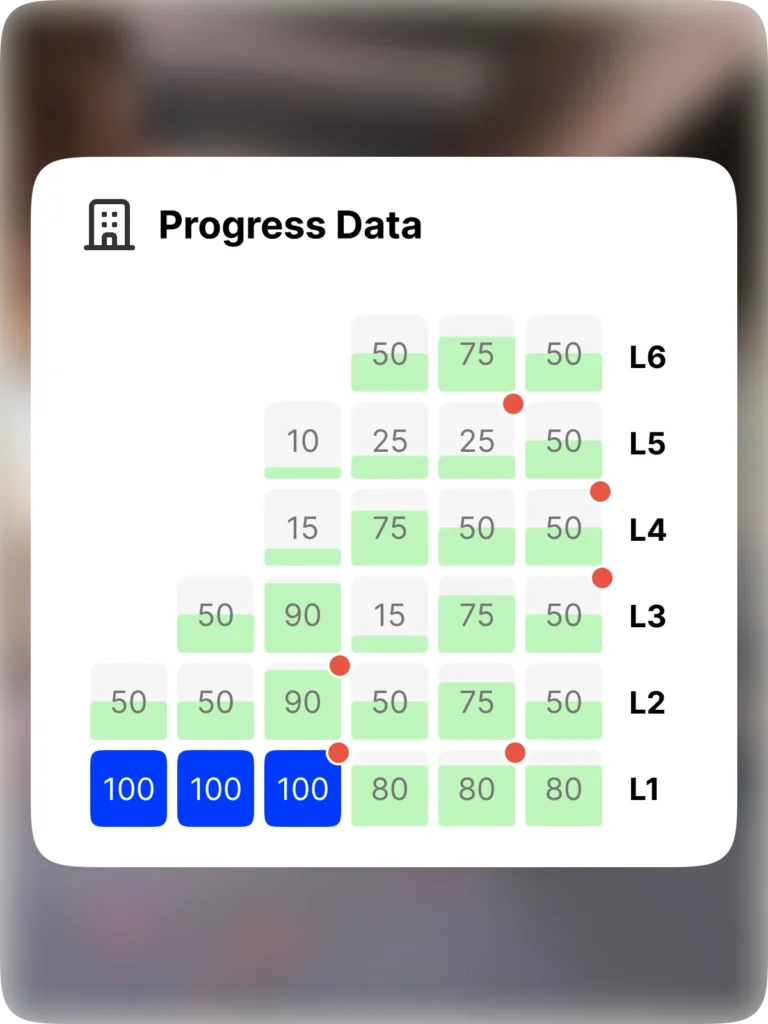
Turn site captures into reliable progress insights. Validate work in place, catch issues early, identify bottlenecks, and optimize resource allocation—all in our Visual Intelligence Platform. Construction teams stay aligned and projects keep moving.
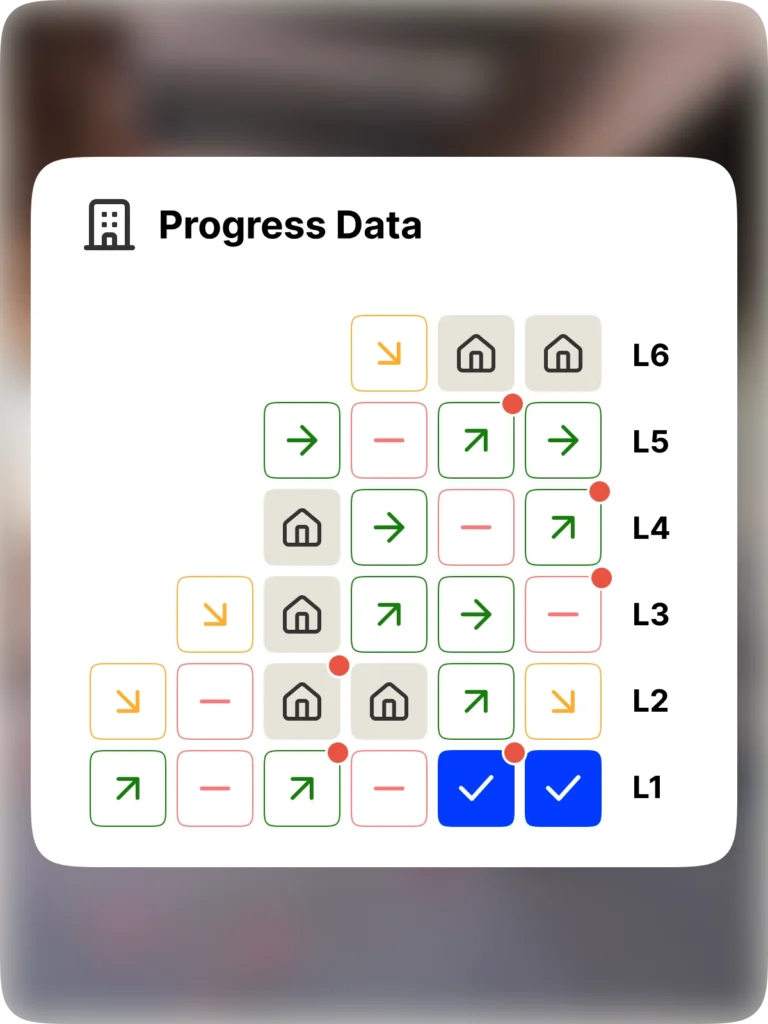
AI + humans
Fast, AI-powered processing backed by review from trained specialists. This hybrid approach turns site captures into progress you can trust. See our OpenSpace Track FAQ for more.
Spotlights
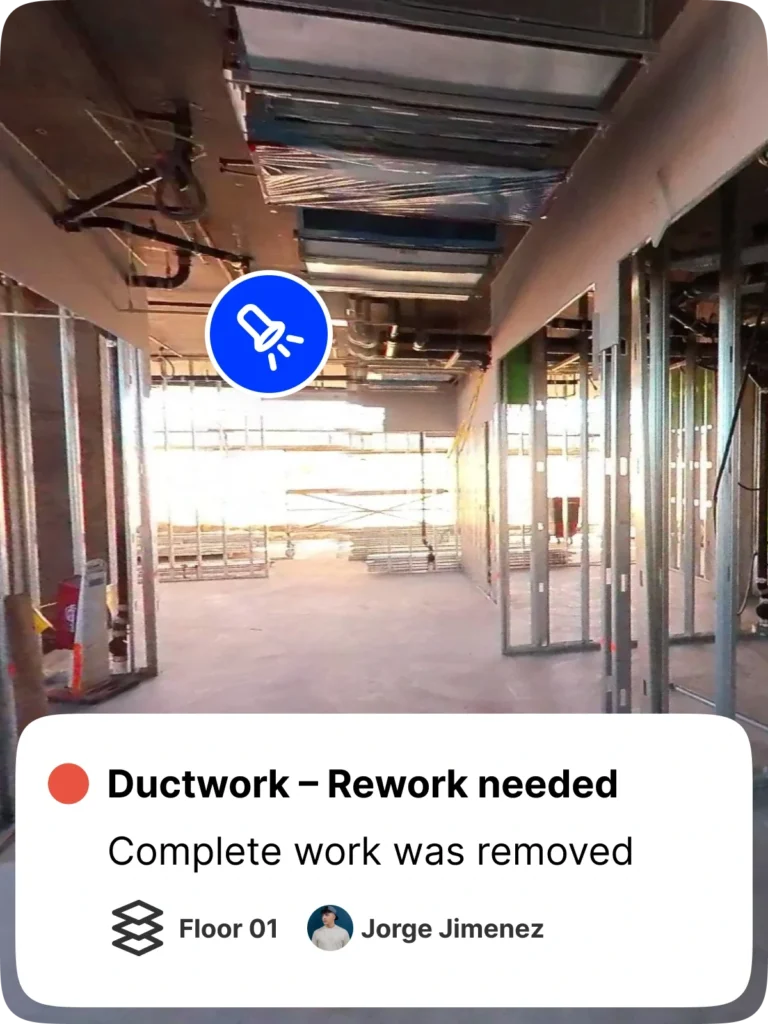
Spotlights flag what’s easy to miss: rework, non-conforming installs, removed or damaged work, and incomplete tasks holding up the next trade. Act while issues are still small.
Quantity tracking + markups
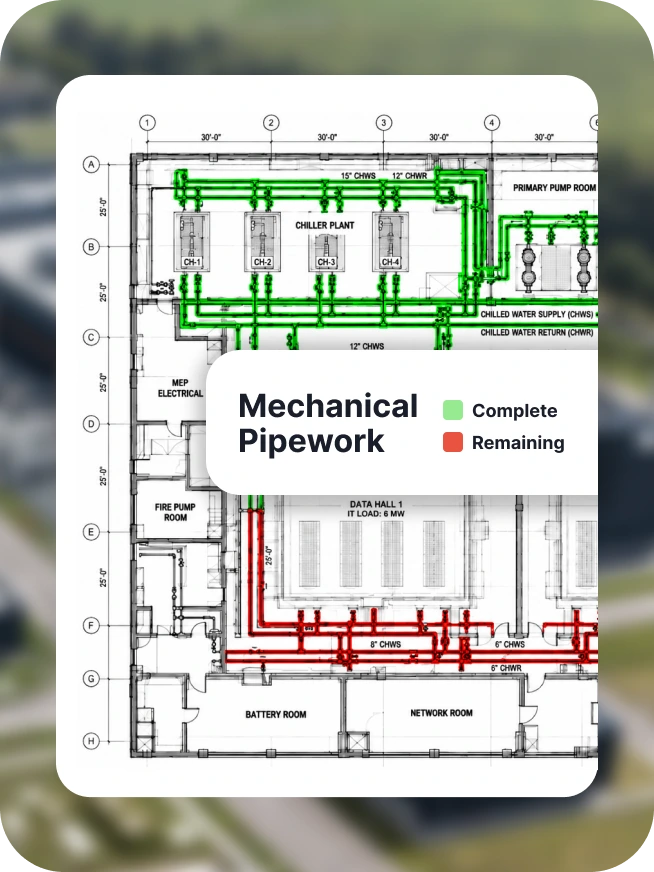
Turn captures into verified installed quantities in linear feet, square feet, or units. Compare planned vs. actual production rates and see completed and remaining work marked up on your drawings. Back pay apps with objective evidence and spot trailing trades before they put the schedule at risk.
Details view
Track trade progress and see if work is on schedule, with direct integration to P6, Asta Powerproject, Microsoft Project, and Excel. Access images and status updates on interactive dashboards.
Put your progress data to work
Feed progress data into the reports and systems your business runs on.
Advanced progress reporting
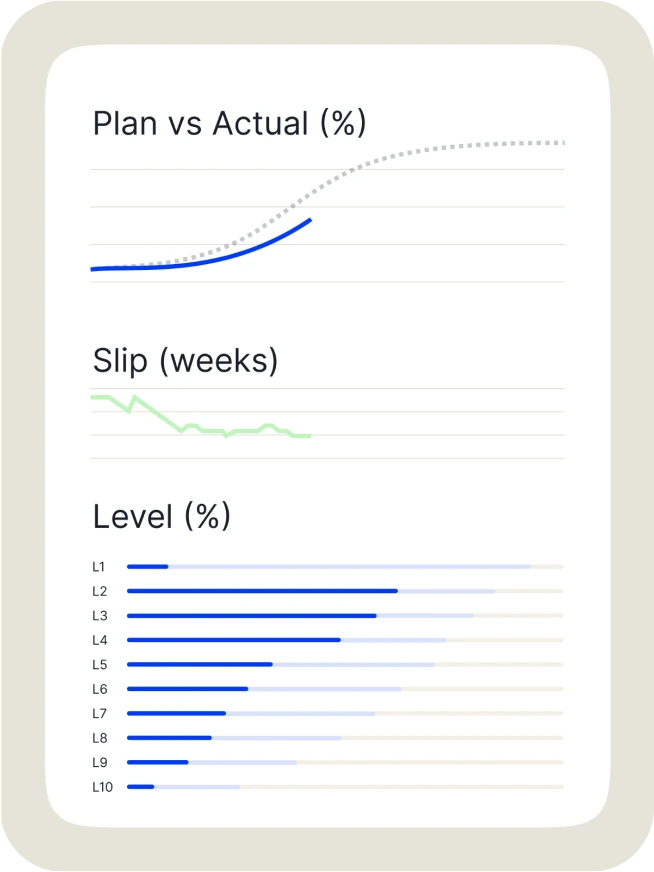
Slice progress by phase, trade, floor, zone, or task. Compare planned vs. actual at a glance, then share reports and executive dashboards with owners and leadership, all backed by verified, time-stamped progress.
Forecasting & predictive analytics
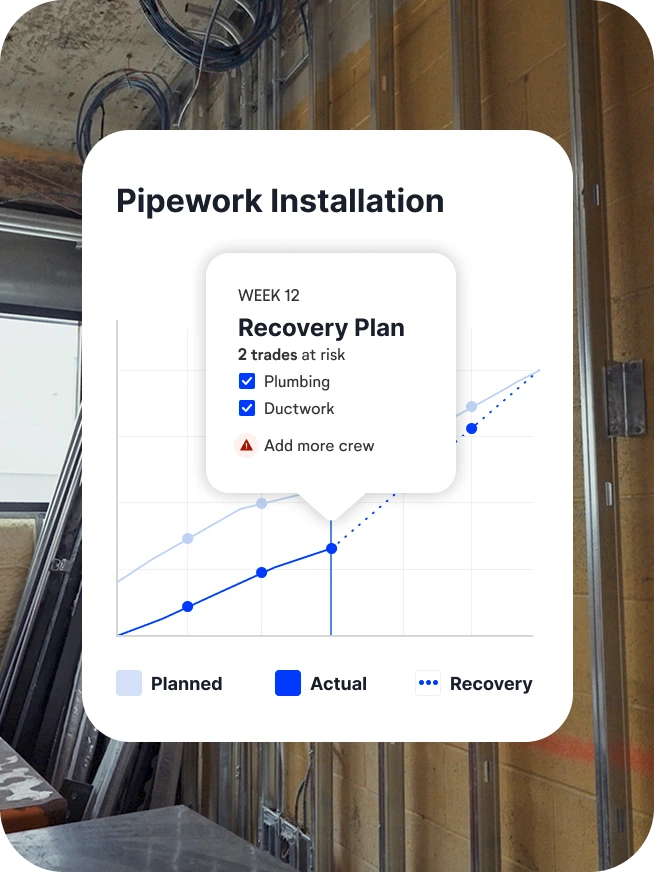
Combine verified progress with project data like crew size and daily reports to see where your project is headed. Answer “how’s the project going?” with today’s status—and where it’s trending.
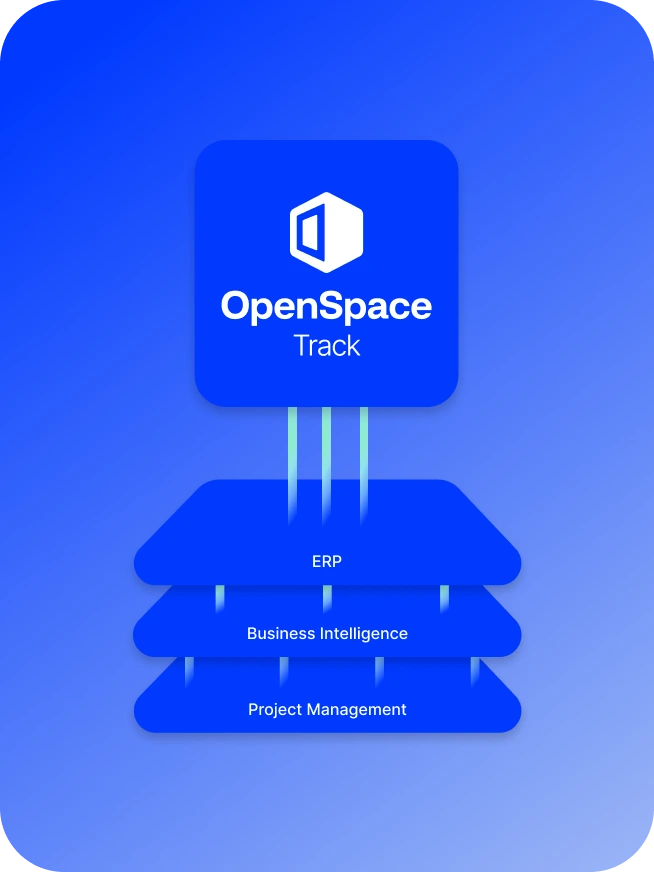
OpenSpace Track API
Bring progress data into your ERP, BI, and project management platforms. Build custom reports and automate pay apps and invoicing. See more on AI Agents & APIs.
Clear progress, fewer surprises
Know where each project stands. Catch issues early. Make decisions while there’s still time to change the outcome.
More efficient teams
Replace manual walkthroughs with verified percent complete, freeing up time for issues and coordination.
Fewer delays
Catch schedule slip while you can still adjust crews or sequencing.
Earlier defect detection
Find rework and non-conformance before it’s covered up.

Smoother handoffs
Spot trailing trades before they block the next crew.

“This system categorically removes the subjectivity. It's a single source of truth. It's very, very difficult to argue, considering the images are tracked back to the schedule, tracked back to the drawings.”

Support & learning. On your time.

OpenSpace academy
Free, on-demand courses with easy-to-follow instructions, tips, and tricks.

Support
Our 360° approach to support: 24×6 support lines plus online support for advice and answers.

ROI
Resources for evaluating how OpenSpace can help you build faster and with less risk.

How OpenSpace Track works
From your drawings to verified progress in five steps.
01
Share your inputs
Send your drawings and project schedule. Add a BIM model—only if you have it.
02
Project configuration
OpenSpace configures tracking around your sequencing, schedule, and which tasks you need to track.
03
Capture weekly
Capture with 360° cameras and drones, same as always. Or hand it off to our Walk & Pilot Services.
04
AI + expert verification
Our AI processes your captures, then trained specialists verify progress for accuracy.
05
Get clear insights
Explore progress in a live web interface, get Spotlights on rework and non-conformance, and share executive dashboards.
Track progress without the guesswork
Frequently asked questions
What is OpenSpace Track?
OpenSpace Track is our construction progress tracking software. Simply capture your site—either on your own or through our Walk & Pilot Services. Then OpenSpace turns your 360° capture data (and drone imagery if you have) into a weekly progress update: how far each trade has progressed against the schedule, shown trade by trade, floor by floor, room by room on the platform.
What can you track with OpenSpace Track?
OpenSpace Track allows you to track over 700 visual components across over 200 schedule tasks. From framing and MEP to finishes and fireproofing, if it’s visible, it can be tracked. You can even create custom components based on your project’s goals and unique needs. Whether you want a high-level project progress overview or granular detail control, OpenSpace Track delivers.
What kind of updates do I get, and how often?
You get a progress update every week, delivered within about 48 hours of your capture. Each update includes refreshed dashboards and Spotlights, your schedule file with actual start and end dates added, and an Excel progress report. Your schedule logic stays as you built it. We add the actuals and send it back.
What does OpenSpace Track show?
Start at the portfolio to see actual vs. planned progress across projects. Open a project to see an S-curve of progress over time and which trades are ahead, on track, or behind. From there, drill into any floor, room, or task, down to details like what’s holding up progress in Apartment 34.
What do I need to capture for best tracking results?
Capture each tracked area weekly, making sure your 360° walk covers the walls, ceiling, and floor of each room. Consistent capture keeps your progress accurate. If an area gets missed, OpenSpace Track flags it, so you always know how current your numbers are.
Can OpenSpace Track use drone imagery?
Yes. On large sites and campuses, drone captures track the external works and site-wide progress that 360° walks don’t cover. OpenSpace works with your team to align drone imagery with your drawings from the start. The resulting progress data is available in OpenSpace Track, while drone imagery can be viewed in OpenSpace Air.
How do you track installed quantities?
OpenSpace Track turns site captures into verified installed quantities in linear feet, square feet, or units. See completed and remaining work marked up on your drawings, compare planned vs. actual production rates, and spot trailing trades before they put the schedule at risk. Capture with your own team, or use OpenSpace Walk & Pilot Services to have our experts handle it for you.
What schedule software does OpenSpace Track work with?
OpenSpace Track supports P6, MS Project, Asta, Excel, and Gantt chart schedules. Updates are shared to your project team in PDF and native file formats so anyone on your team can view schedule and project progress data and make more informed decisions.
Does your construction progress tracking software require BIM?
No, BIM is not required to use OpenSpace Track. If you can see it, we can track it. The solution works directly from your 360° image captures, making it fast and easy to deploy on any project—regardless of whether a BIM model is available. That said, if you do have a BIM model, we can incorporate it to enhance the analysis and alignment of your progress data. The flexibility to work with or without BIM ensures that teams can benefit from progress tracking on construction projects of all sizes.
How does OpenSpace Track work with my captures?
You’ll capture your site just like normal—no extra work required. Once you capture your site (typically taking just 10 minutes to capture 25,000 sq. ft.), we analyze the visual data, connect it with your project schedule or program, and deliver clear, structured progress reports—between 24-48 hours.
What are the most common uses for OpenSpace Track?
Our construction progress tracking software is used across a wide range of construction workflows to provide real time visibility, accountability, and efficiency. Project teams rely on it to validate work-in-place for billing and payment applications, identify schedule risks early by comparing actual progress to planned milestones, and coordinate more effectively across trades using objective updates. It’s also a powerful tool for managing quality, ensuring installation completeness and sequencing, improving communication, and delivering clear, visual progress summaries to owners and stakeholders. Whether you’re a general contractor, developer, or trade partner, OpenSpace Track helps keep everyone aligned and projects on track.
Find more details about OpenSpace Track in our FAQ blog.
How does OpenSpace Track improve efficiency?
When you eliminate the tedious work of walking around with a clipboard and highlighter to document the status of specific areas, you gain hours to focus on other tasks. With OpenSpace Track dashboards, data, and images at your fingertips, documenting and communicating progress is more efficient. Ultimately, improving the accuracy of your schedule is the biggest gain—you’ll have insight into whether you’re on track for a profitable, on-time delivery or are in danger of significant delays and project cost overruns.
What does OpenSpace Track cost?
OpenSpace Track works with OpenSpace Capture and is sold as an add-on to your OpenSpace Core or Enterprise subscription license and available at the project level or for your entire portfolio of projects. Your price is based on the type of project and scope of what you’re looking to track. For example, you can add functionality like quantity tracking and markups to your subscription. Contact us to learn more.