2025: An inspirational year of innovation & building
As the year wraps up, I want to say something pretty simple: ...
August 6, 2025

Shortly after the launch of OpenSpace Progress Tracking, we had the privilege of sitting down with Elliot Christiansen, Sr. Vice President of Operations at Cleveland Construction, an early customer who provided invaluable input during product development. Elliot shared insights about Cleveland Construction’s journey with OpenSpace including, how his team is already leveraging OpenSpace Progress Tracking across projects.
During the conversation and live demo we received some great questions from attendees. In this blog we’ve answered questions covering use cases, functionality, and reporting. (If you missed the webinar, you can watch the on-demand recording.)
OpenSpace Progress Tracking can pick up anything visually distinguishable in an image, including small items such as sockets and sprinkler heads.
Drone imagery in OpenSpace Air can already be used to track exterior and site work scopes.
Yes, the ideal approach for heavy civil projects is to capture with drones and use OpenSpace Air to process and host the images which will provide the visual context to track progress in the OpenSpace platform.
OpenSpace Progress Tracking works on repeatable and one-off bespoke projects—any project where objective data can provide insights to help your teams solve challenges like labor shortages, tight schedules, and limited budget.
Yes, you can track industrial piping to get valuable insights on civil construction projects.
Yes, a variety of subcontractors (wall, mechanical, electrical) are using OpenSpace Progress Tracking to manage schedules, monitor progress, and prepare and review payment applications.
Yes, we work with our customers to define the tracking scope, adapting to each customer’s needs. We have projects where we deliver full schedule tracking (all trackable tasks in the schedule) and more focused projects where we may work with the drywall or electrical trade on a select few tasks, to a higher depth of detail.
If you’re using BIM, it’s a helpful design tool to support tracking, but it’s not required. OpenSpace Progress Tracking can be set up, and works well, with PDF drawings only.
Yes, that will be enough to track progress against the schedule and to leverage the full OpenSpace Progress Tracking feature set. The only missing functionality in this case is the ability to export schedule data back into the native file.
We understand that change is a constant in the AEC industry. Updates to the model and schedule or programme are made by our team on request. If the model itself won’t be complete enough for tracking over the course of the project, PDF construction drawings are enough to set up OpenSpace Progress Tracking. We’ll also process any changes to the model or drawings throughout the lifecycle of the project. For example, if we’re tracking ductwork appearing in the room, but is different from what’s modelled, we’ll still track it based on the path specified in drawings or flag that it’s not following the documentation.
To avoid any issues when capturing varying heights on one location we recommend switching to a separate catwalk floorplan before going up. Our team is currently working on an improved multilevel capture experience.
Yes, you can import terrestrial LiDAR scans to the OpenSpace platform to inform progress tracking.
For best results, we typically recommend doing a comprehensive capture once a week. However we’ll work with you to recommend an appropriate cadence if you prefer less frequent progress updates.
OpenSpace captures are typically done by a project engineer during their daily site walks. The images from OpenSpace Capture and the data delivered by OpenSpace Progress Tracking are then accessible for all roles and teams, including superintendents, project managers and executives, schedulers, operations leaders, and owners.
We haven’t had any issues receiving design documents like drawings and models. OpenSpace keeps all received documentation confidential. You can learn more about data privacy and security on the OpenSpace Trust Center.
The typical turnaround time is 24-48 hours. We align with customers on an agreed delivery day for the progress reports and a cutoff point for the captures one or two days prior to ensure timely processing.
This particular format is not currently part of the standard reporting suite, but we’re open to supporting customers with custom reports or providing the data. Contact your OpenSpace rep or request an OpenSpace Progress Tracking demo here.
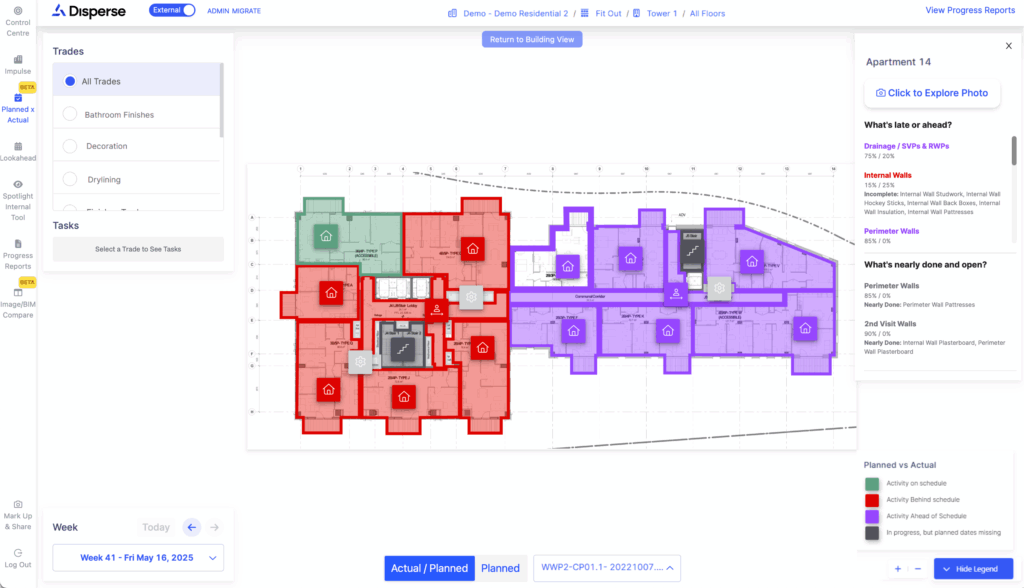
Yes, with our schedule integration, we provide a variety of options to show the progress of planned vs. actual work on the platform.
We use project documentation to identify the completed state of each activity. When an OpenSpace capture is completed, we identify changes from one week to the next and assesses the completion status of each activity, using a hybrid-AI approach and in-house expert teams of construction professionals to ensure accurate and comprehensive progress outputs.
With our issue tags feature you can review any issues detected (rework, non-conformance to documentation, etc.) between different capture dates in a side-by-side view. Insights on progress changes are presented in the platform UI and in reports, including an ability to view the progress highlights for each space while viewing the photo. OpenSpace Progress Tracing does not separately highlight each changed element in the photo.
This functionality is something we are working on. Stay tuned for updates.
Yes, you can use Microsoft Project schedules for tracking against planned data.
We do not currently have a direct integration with Vista. However, Vista can import CSV files so users can convert the provided Excel reports to CSV and import to Vista.
Since OpenSpace has a direct integration with ACC, we can explore importing compatible data. If given access, we can process project documentation from ACC.
We’re happy to talk to you about implementing OpenSpace Progress Tracking on your projects. Request a demo now!